

Google is developing keyboard shortcuts for Googlebook OS to play, pause, and skip media tracks, with plans to add them in a future update.
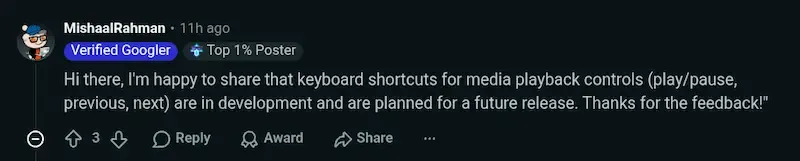
Google's Mishaal Rahman revealed the plans on Reddit, while also sharing a current workaround to pause audio from the status bar.
Media Playback Shortcuts in Development
In the Reddit thread, a Lenovo Googlebook 15 user asked for a workaround because the keyboard includes a mute button but lacks a button to pause audio.
Among the first wave of Googlebooks, only the ASUS Googlebook 14 has a dedicated play/pause key on its keyboard. The Lenovo Googlebook 15, Dell XPS Googlebook, HP Googlebook 14c, and Acer Googlebook 14 do not include one.
In response, Rahman said in a reply that keyboard shortcuts for play/pause, previous track, and next track are in development and planned for a future release. However, he did not mention a specific rollout timeline or the exact key combinations.
Currently, Googlebook OS only supports keyboard shortcut customization through the Gboard app, which leaves users with limited customization options overall.
Workaround Using the Status Bar
When playing music in a browser, pressing the Space key only pauses playback if the active media tab is visible on screen, requiring you to switch back when using another app or tab.
Googlebook lets you play or pause media from the chip that appears in the status bar during playback.
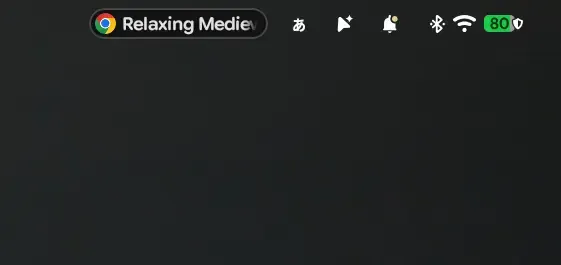
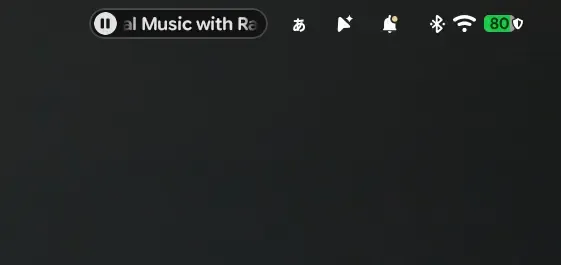
Hovering the cursor over this chip turns the icon of the app playing music into a play/pause button.
Clicking it lets you pause or resume playback without switching away from your active window, serving as a workaround until the keyboard shortcuts are implemented.