

We recently reported that Magic Pointer made its debut on the Google Play Store as a standalone app, and now we finally have a clear picture of how this feature actually works under the hood on Googlebook.
Following an APK teardown of the app conducted by Android Authority, it was discovered that the app contains the exact raw prompt strings used to instruct Gemini to generate suggestion chips. This code gives us a fascinating glimpse into how Magic Pointer interprets user selections and the specific criteria it uses to filter and surface the best AI recommendations.
Categorizing User Selections into Four Distinct Pillars
First, the underlying prompt directs Gemini to classify the user's selected screen area into one of four core categories:
-
Understand: Interpreting and extracting information from the selection, such as explaining a complex chart, identifying a plant, or summarizing an active thread.
-
Transform: Editing and content creation tasks, including rewriting text, translating languages, or converting unstructured data into a formatted table.
-
Ideate: Going beyond the immediate input to offer creative suggestions, such as recommending a meal plan based on a recipe or providing contextual travel insights for a selected destination.
-
Execute: Action-oriented tasks ranging from drafting email replies, creating calendar events, and setting reminders, to handling real-world actions like booking a ride-share, ordering groceries, or even tweaking system settings (e.g., toggling Wi-Fi or adjusting mobile data limits).
When surfacing three suggestion chips, the AI is explicitly instructed to pull from different categories to ensure variety. However, depending on the on-screen context, it is perfectly acceptable for the system to generate fewer than three options.
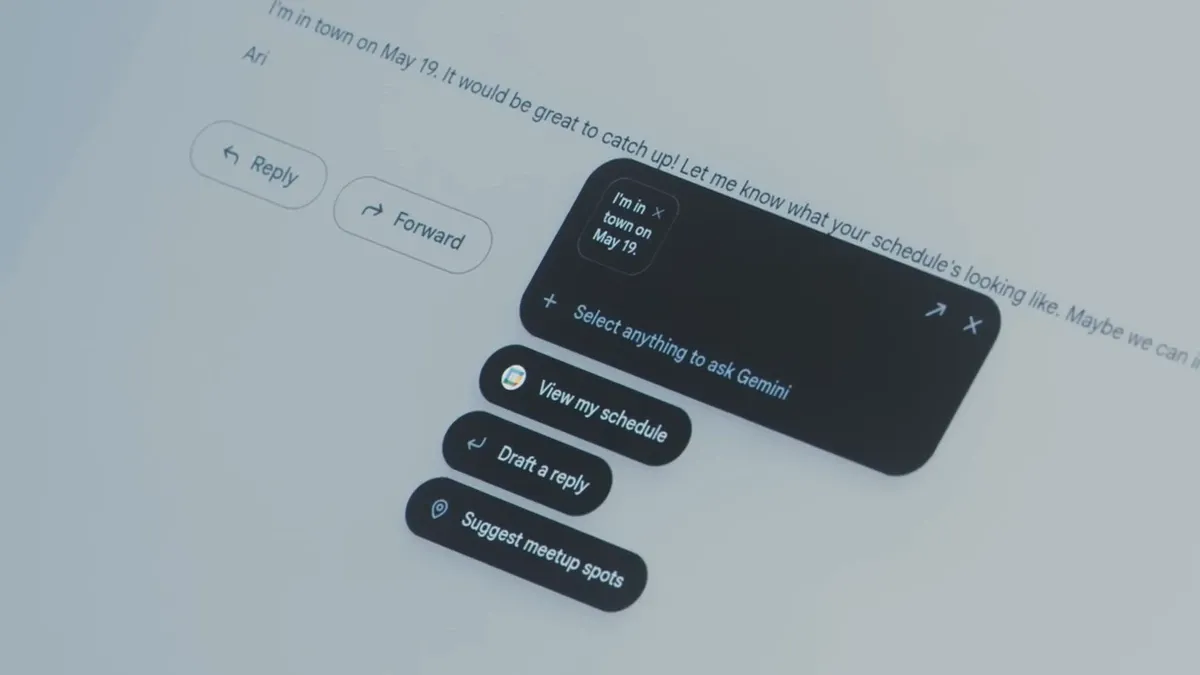
The prompts also reveal strict formatting rules for these suggestion chips. Each chip is limited to a maximum of 45 characters, capped at three total suggestions, and must be framed in a first-person perspective, typically starting with a verb or a question format. The system is designed to avoid generic, low-effort prompts like "Tell me more," forcing Gemini to generate highly contextual and specific suggestions tailored exactly to what the user highlighted.
Designed to Keep You in the Gemini Ecosystem
Furthermore, the teardown indicates a deliberate design choice: Magic Pointer is programmed to avoid redirecting users to external third-party apps or standard OS-level actions. Based on the analysis, it is designed to filter out any operations that cannot be completed entirely within Gemini itself.